Resource Age and Its Impact on Cacheability
When deciding how long to cache a response, it’s important to consider how often the response may change as well as the cost of revalidation. A resource that is updated frequently would benefit from a short cache duration, which offloads the origin while ensuring content freshness. Likewise, a resource that rarely or never changes would benefit from a longer or even immutable cache duration. In HTTP, cache freshness lifetimes are typically configured with the max-age directive in the Cache-Control response header, which indicate how long a resource can be served from a cache.
One often overlooked aspect of caching web content is the Age header, which can influence how long — or if at all — a cached response will be considered fresh. You might be surprised to learn that 13.7% of websites experience a cache inefficiency due to content being served with an Age header that is greater than the max-age duration! In this article, we’ll discuss what is happening and explore HTTP Archive data to find some examples.
Age vs Max-Age
When a server wants to indicate that a response is cacheable, it can set a Cache-Control header with a max-age directive to specifies how long the response can be considered fresh in a cache. This is often referred to as a TTL (time to live). For example, Cache-Control: max-age=3600 means “this response is fresh for 1 hour”. There are lots of other caching directives, and if you want to read up on them then check out Harry Roberts’ overview of them here.
The Age header is added by intermediary caches, such as CDNs, and it is used as an input to calculate freshness. It’s essentially the number of seconds since the response was generated or validated. When considering the freshness of a response, a cache will look at the max-age value and subtract the response’s age from it.
For example, if you have 2 tiers of caching (browser and CDN) each being served a response Cache-Control: max-age=60 and no Age header, then that resource may be served from a cache up to 120 seconds later. But if an Age header is present in the response, then that resource would be considered stale across all caches after 60 seconds.
So how could this go wrong? Imagine an infrequently updated resource is delivered with a short max-age value. If an intermediary cache stores the response for a longer period than it is instructing the browser to, then the response’s age could easily exceed the max-age value. In the example below, attempting to fetch this response from cache would trigger a request for revalidation because the effective TTL would be -200 seconds.
Cache-Control: max-age=600
Age: 800
If the Cache-Control header includes the stale-while-revalidate directive, then that would allow a cache to use its stale resource while asynchronously sending a revalidation request. However, that is only if the Age is less than max-age + stale-while-revalidate durations. In the example below, the response with an age of 800 seconds will allow a cache to use the stale resource because that is still below 900 seconds.
Cache-Control: max-age=600, stale-while-revalidate=300
Age: 800
However a response with an age of 1200 seconds would trigger a conditional request for validation because that exceeds 900 seconds. So stale-while-revalidate helps eliminate latency on cache refreshes, but that only stretches so far.
Cache-Control: max-age=600; stale-while-revalidate=300
Age: 1200
What Does the Caching Specification Say
Before we look at the HTTP Archive data for examples, let’s look at how this behavior is defined in the relevant specifications. For Cache-Control and Age, we’ll look at RFC9111 (HTTP Caching). For stale-while-revalidate we’ll look at RFC5861 (HTTP Cache-Control Extensions for Stale Content).
RFC9111 section 5.2.2.1 says the following regarding the Cache-Control’s max-age directive:
The max-age response directive indicates that the response is to be considered stale after its age is greater than the specified number of seconds.
It also says the following about the Age header in section 5.1:
The “Age” response header field conveys the sender’s estimate of the time since the response was generated or successfully validated at the origin server.
The presence of an Age header field implies that the response was not generated or validated by the origin server for this request. However, lack of an Age header field does not imply the origin was contacted.
According to the web platform tests, modern browsers will not reuse a response when the Age header is greater than its Cache-Control max-age freshness lifetime. This is also true for many modern web servers, with the exception of NGINX.
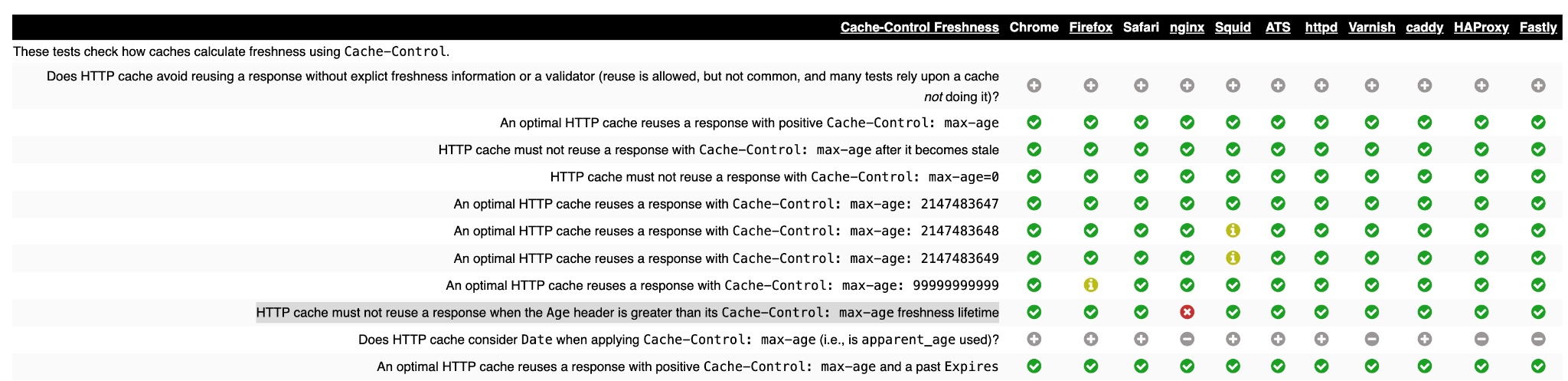
As you read in the earlier example, there’s a caching directive called stale-while-revalidate that allows a cache to use a stale version of a resource while it is revalidated. This is described in RFC 5861 (HTTP Cache-Control Extensions for Stale Content) and supported by all modern browsers and most CDNs.
When present in an HTTP response, the stale-while-revalidate Cache-Control extension indicates that caches MAY serve the response in which it appears after it becomes stale, up to the indicated number of seconds.
How Many Websites Serve Assets with Negative Effective Cache TTLs
Out of 15.3 million websites in the HTTP Archive’s August 2026 dataset, approximately 13.7% of sites served at least 1 response (either first or third party) that was already stale on delivery. If we look at just the most popular websites in the dataset, that increases to 30%.
This also occurs for first party content on 247k websites. This can result in performance issues, since cache reuse may be delayed by the revalidation time. Essentially serving stale content could potentially impact repeat visitors by causing them to wait for revalidations on blocking requests.
The table below breaks this down by CrUX Popularity Rank:
| Websites Serving Stale Content (Age > Max-Age) | ||||
|---|---|---|---|---|
| First Party | All Requests | |||
| Rank Group | Sites | % of Sites | Sites | % of Sites |
| 1k (762 sites) | 64 | 8.40% | 209 | 27.43% |
| 1k-5k (3,016 sites) | 264 | 8.75% | 969 | 32.13% |
| 5k-10k (3,750 sites) | 301 | 8.03% | 1,147 | 30.59% |
| 10k-50k (30,015 sites) | 2,307 | 7.69% | 8,427 | 28.08% |
| 50k-100k (37,799 sites) | 3,067 | 8.11% | 9,954 | 26.33% |
| 100k-500k (311,432 sites) | 22,155 | 7.11% | 77,940 | 25.03% |
| 500k-1M (399,337 sites) | 19,663 | 4.92% | 91,451 | 22.90% |
| 1M-5M (3,339,558 sites) | 81,296 | 2.43% | 611,380 | 18.31% |
| 5M-10M (4,333,167 sites) | 51,665 | 1.19% | 590,540 | 13.63% |
| >10M (6,883,422 sites) | 66,310 | 0.96% | 710,537 | 10.32% |
How to Check for this on your site?
One way to examine this on your site is to use browser DevTools or run instant tests on services like WebPageTest. Examining response headers can indicate whether there is a potential caching problem.
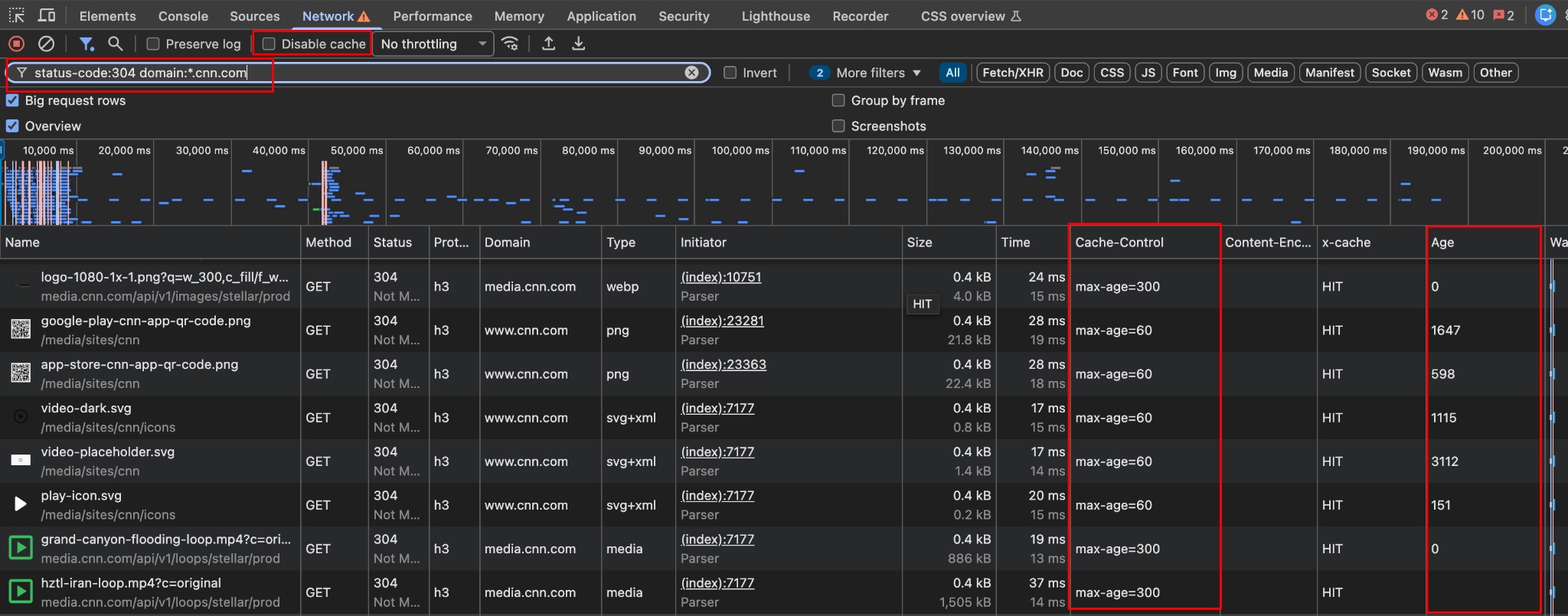
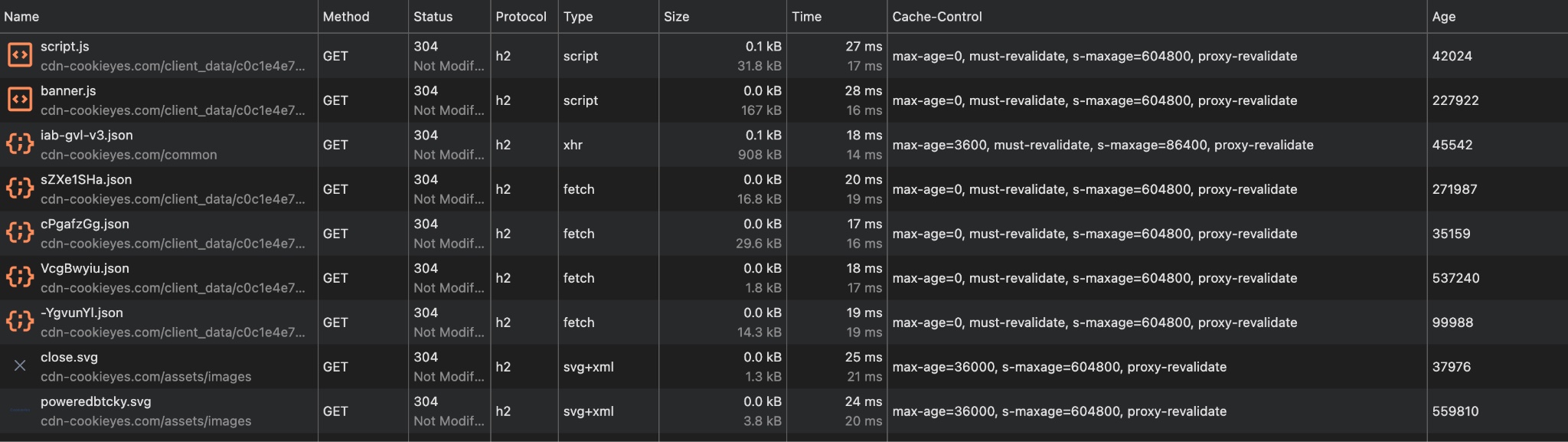
In Chrome DevTools you can add Cache-Control and Age headers to the displayed columns. If you unselect “Disable Cache” and visit a page for a second time then you can filter by status-code:304 and look for responses with a large Age headers and compare them to the max-age.
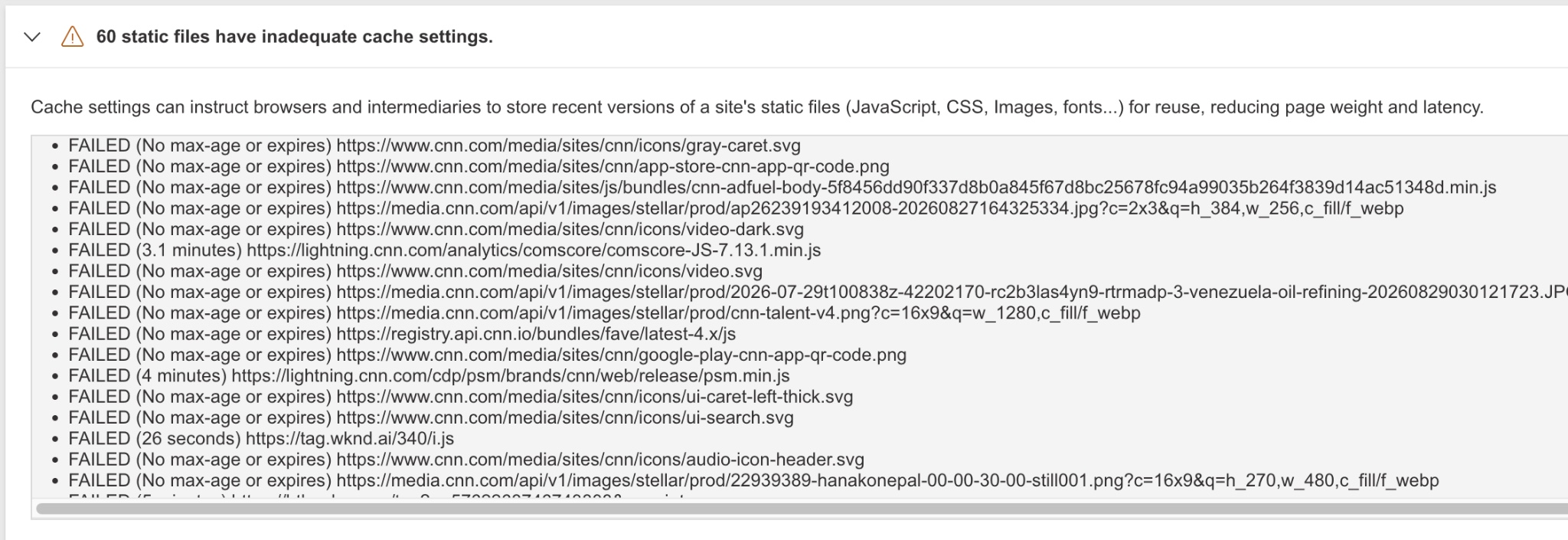
WebPageTest has an Optimization Summary that identifies static assets with inadequate cache settings. It catches this, but assigns an error message of “No max-age or expires”.
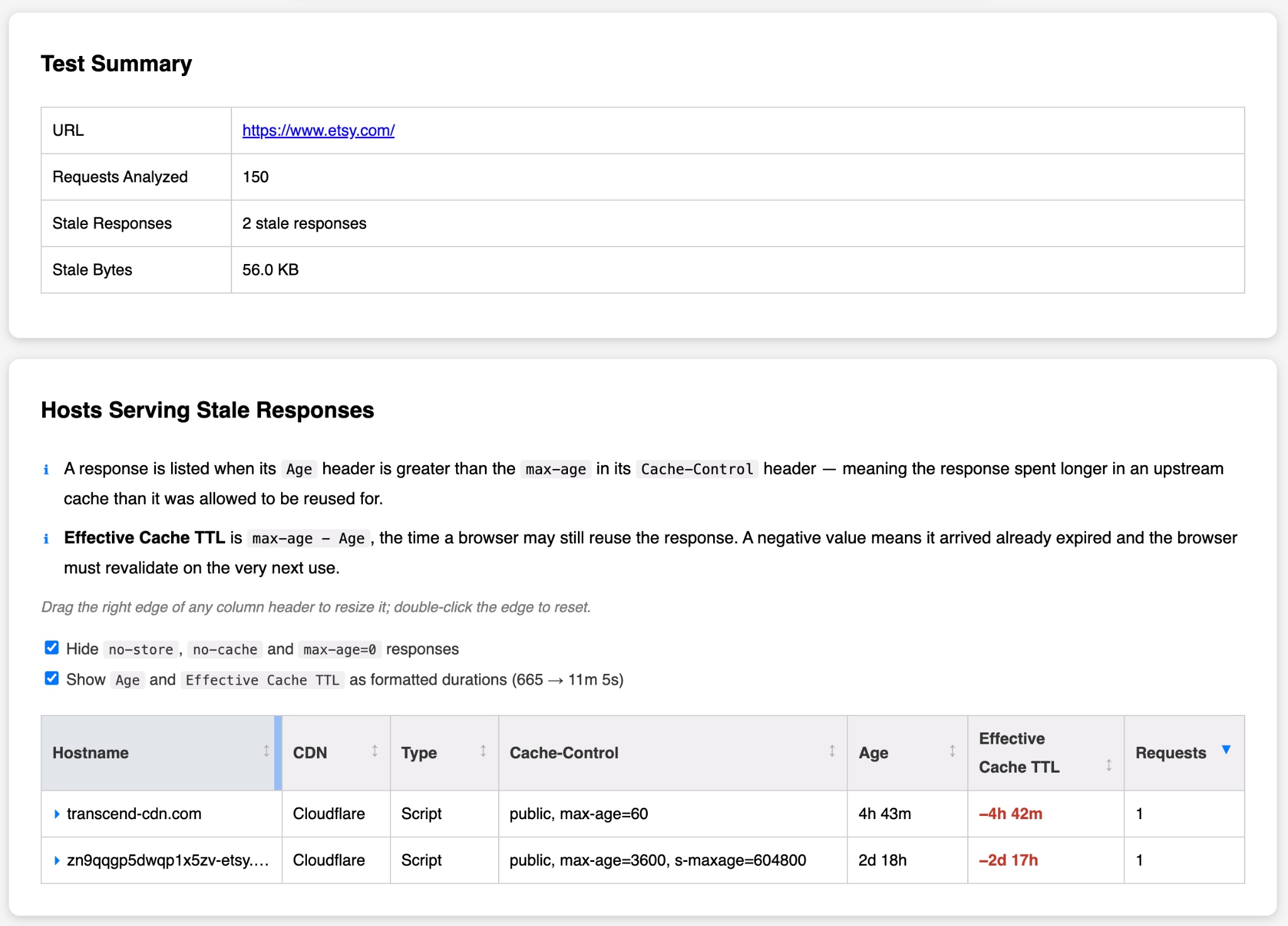
Another approach to investigating this is to download a HAR file from your tool of choice and then analyze the results from that file. I created a tool that does exactly that and it currently supports WebPageTest URLs (you need to create a public share link from the Catchpoint UI or share a private instance URL) or HAR files. It will scan the list of requests and provide details on the responses that were delivered stale. You can find it at https://tools.paulcalvano.com/stale-resource-checker/.
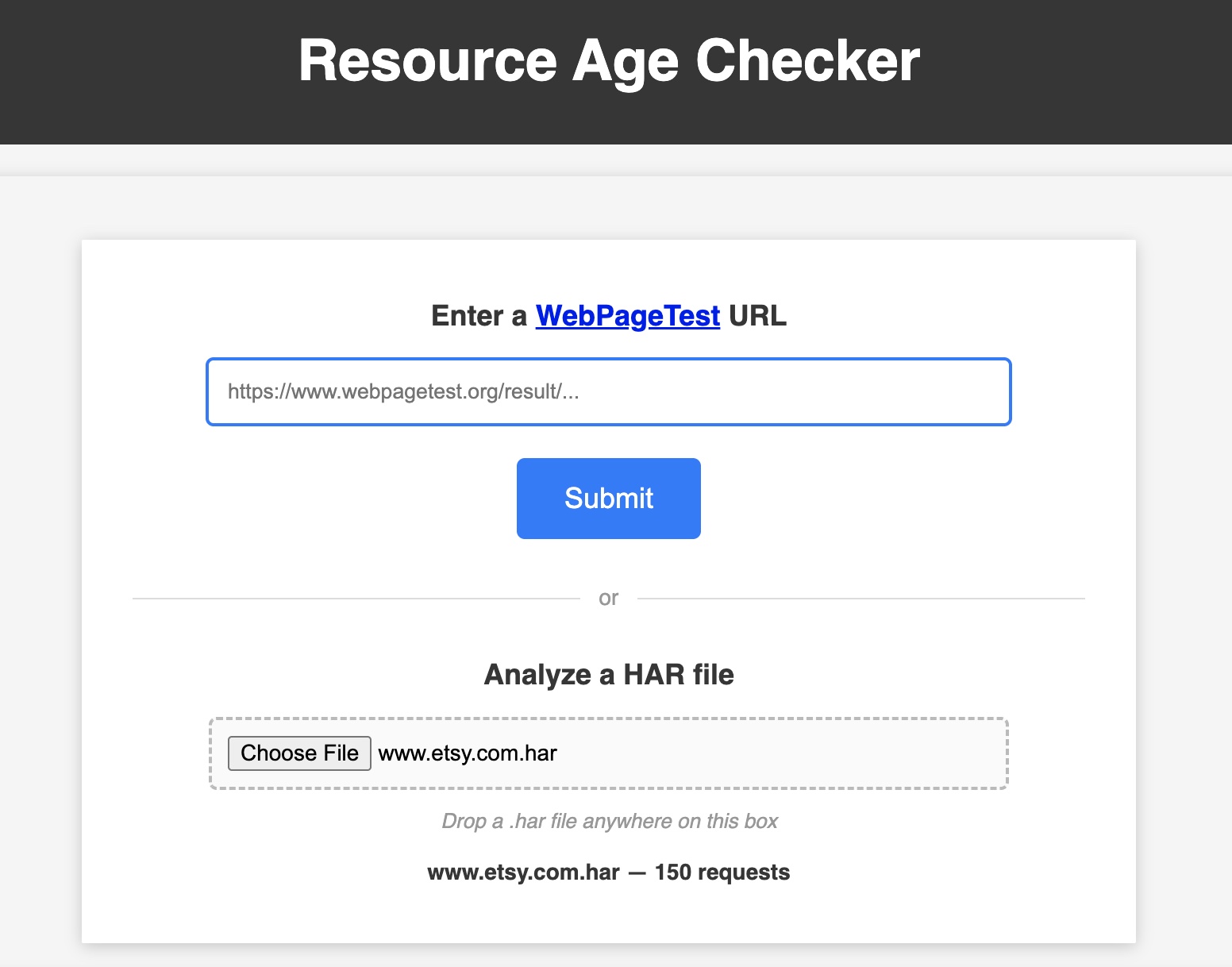
When I ran this on Etsy’s website, I found a few responses that were served stale from third parties. Subsequent requests for these resources would trigger a conditional GET request — and the browser would wait for the HTTP 304 response before using its cache (or a HTTP 200 if the content was no longer fresh). Using stale-while-revalidate in these cases would allow the browser to reuse the cached content while asynchronously performing the conditional GET request. I’ve reached out to the third parties to update the cache-control header.
Examples!
Let’s explore this data some more and look for examples from the HTTP Archive. After seeing a few of these, it should hopefully be very easy to spot when this is occurring on your site. The examples below were taken from HTTP Archive’s August 2026 dataset.
First Party Content
On CNN’s website, most image elements are delivered with Cache-Control: max-age=300, and SVGs are delivered with Cache-Control max-age=60. Many of these responses were served stale, and some were hours old. It’s possible that they are caching these assets longer on their CDN via a s-maxage directive (which may be stripped before sending the response to the client). In any case, a longer cache TTL would be ideal for this type of static content. And stale-while-revalidate could help avoid waiting for a revalidation on a subsequent navigation.
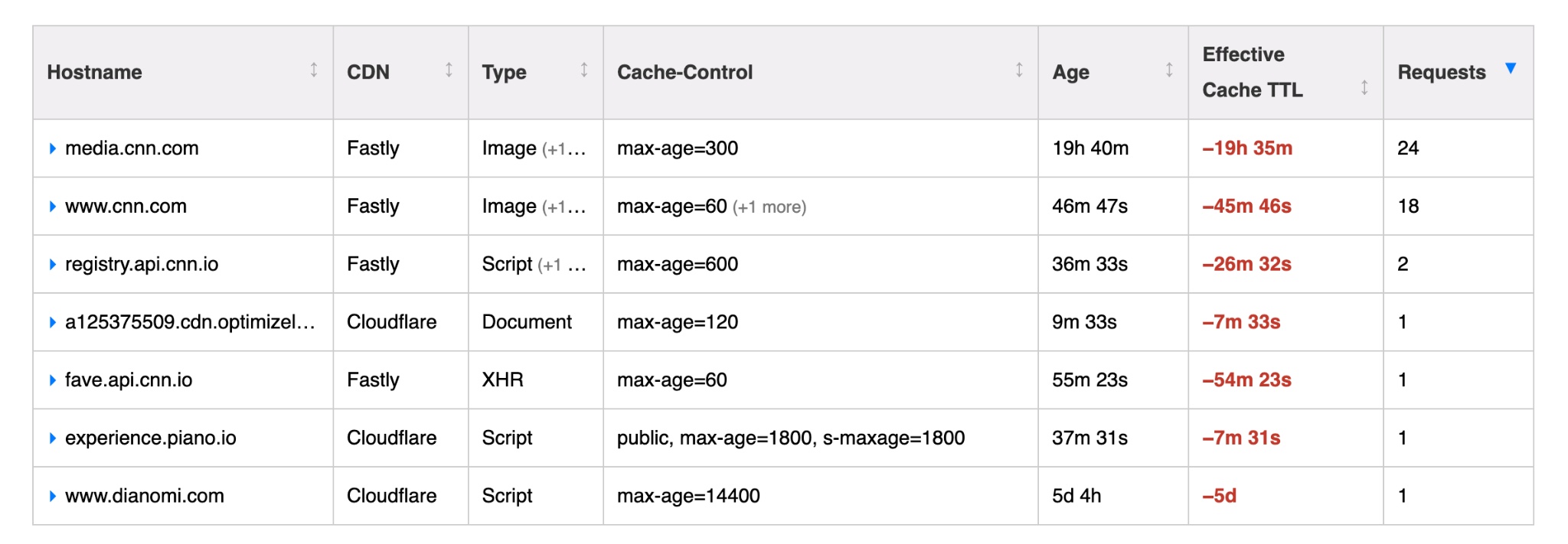
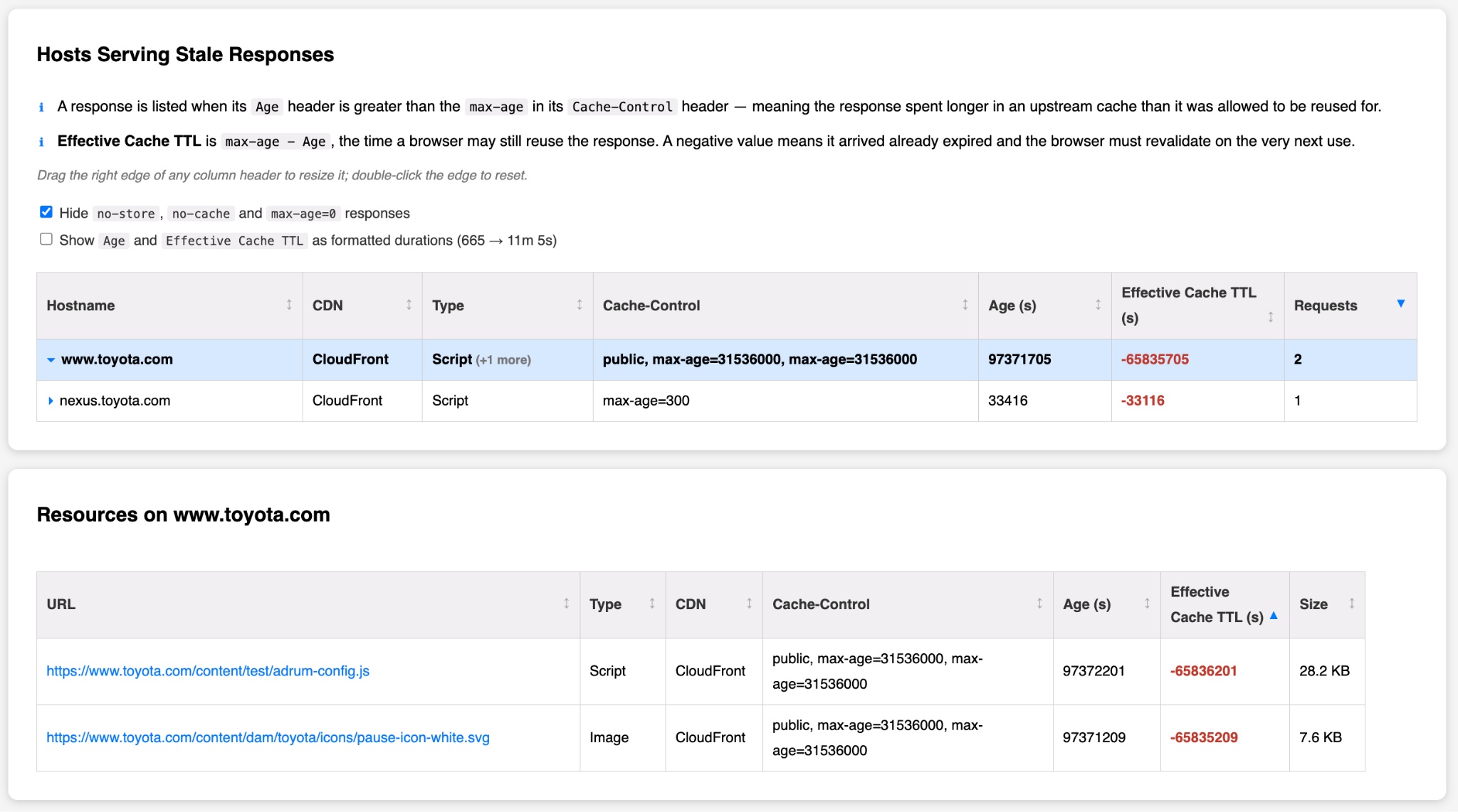
Overall the CNN website delivered 42 first party responses that were stale at the time of the request. The table below shows an example of the request from www.cnn.com. Correcting this would likely improve user experience for visitors, since they are sending conditional requests along with each article being read, and these SVG elements appear on most pages.
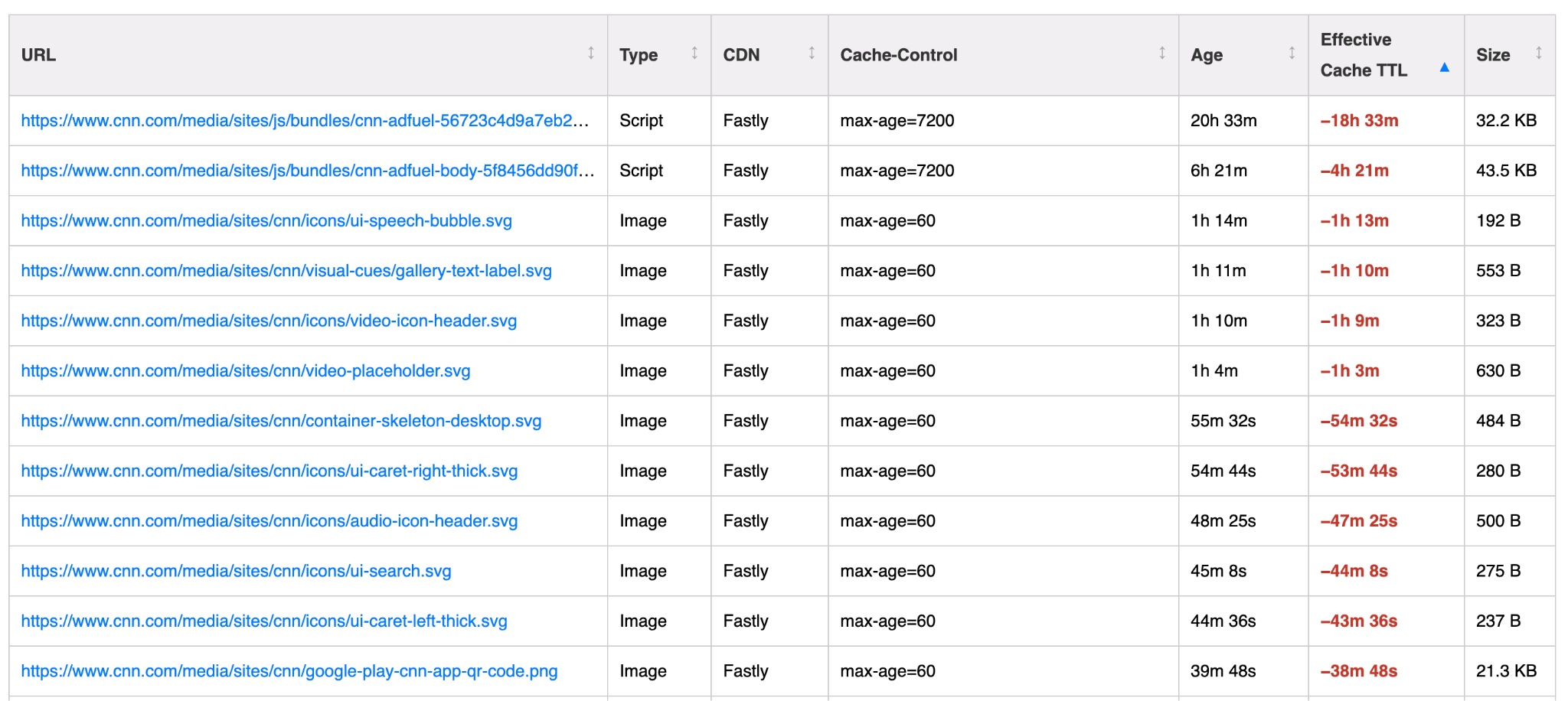
On Toyota’s website, their RUM script as well as one of their SVG assets were delivered with a freshness lifetime of 1 year. However these responses have been in cache for over 3 years. Additionally it seems that they are sending duplicate max-age values. Browser behavior can vary when this happens, with some choosing the first or last max-age directive, but they could also consider it invalid.
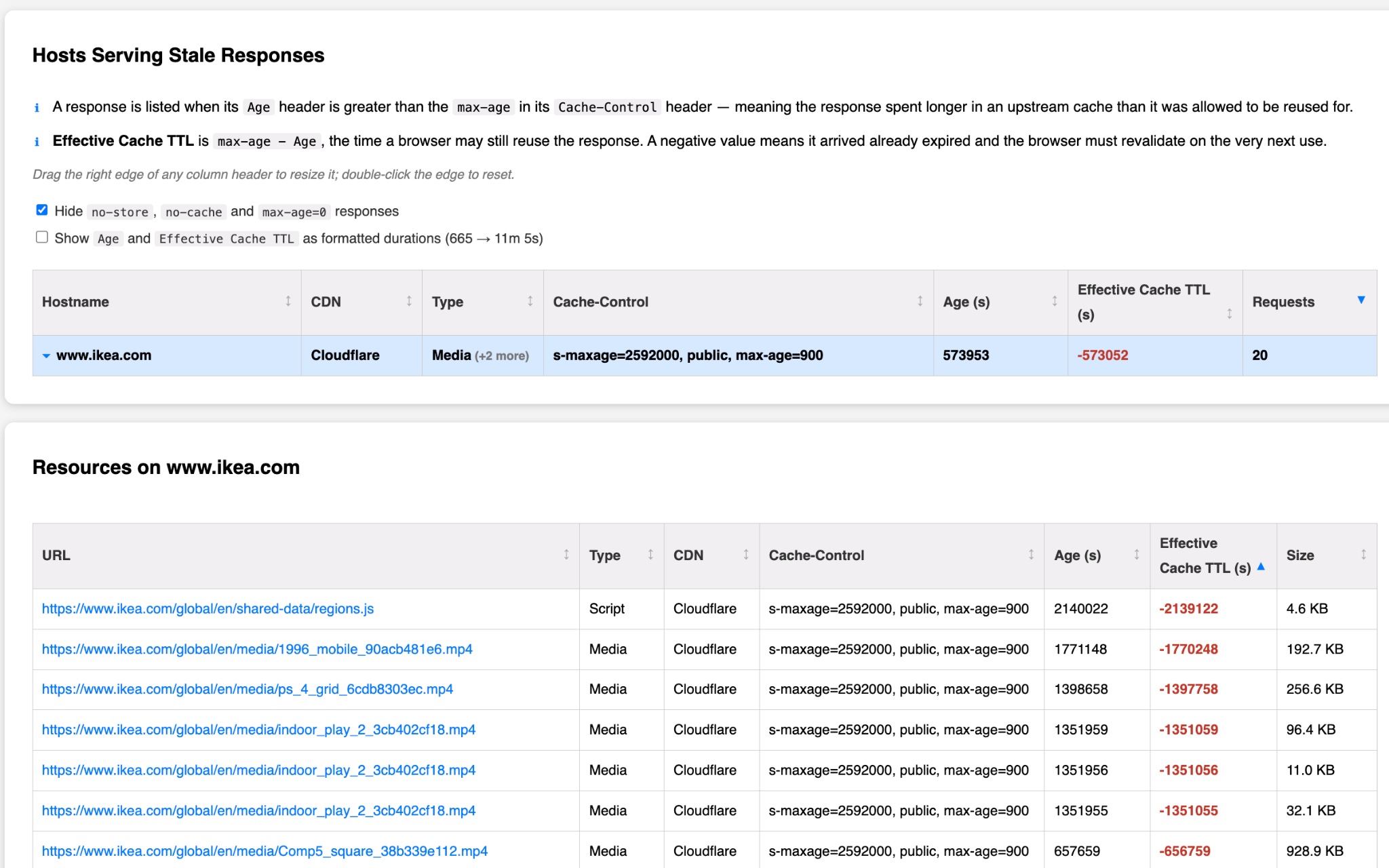
On Ikea’s website, we can see an example where numerous assets have Cache-Control: s-maxage=2592000, public, max-age=900. This is telling the CDN that the response can be considered fresh for 30 days, but telling the browser it’s only fresh for 15 minutes. Similar to the previous examples, stale-while-revalidate could be leveraged to avoid waiting for a revalidation on a subsequent navigation, and ideally the value for that should be closer to the s-maxage value.
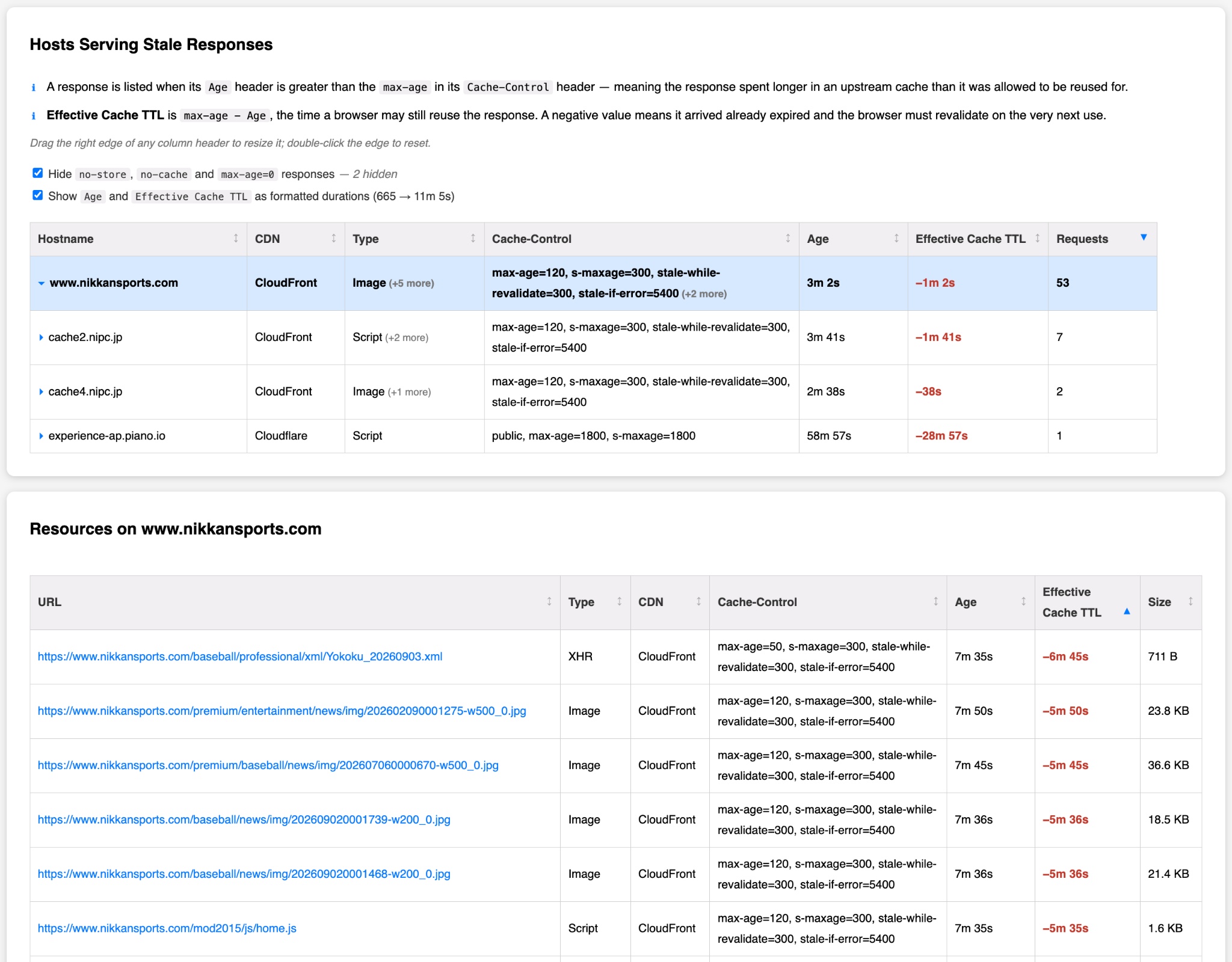
NikkanSports is delivering images with a freshness lifetime of 120 seconds, and a s-maxage header telling the intermediary cache it’s fresh for 300 seconds. They are also setting stale-while-revalidate to 300 seconds. This is one of the best scenarios of these examples, since the content will not remain stale long. However considering that these responses are static and versioned, a longer cache duration might be worth considering.
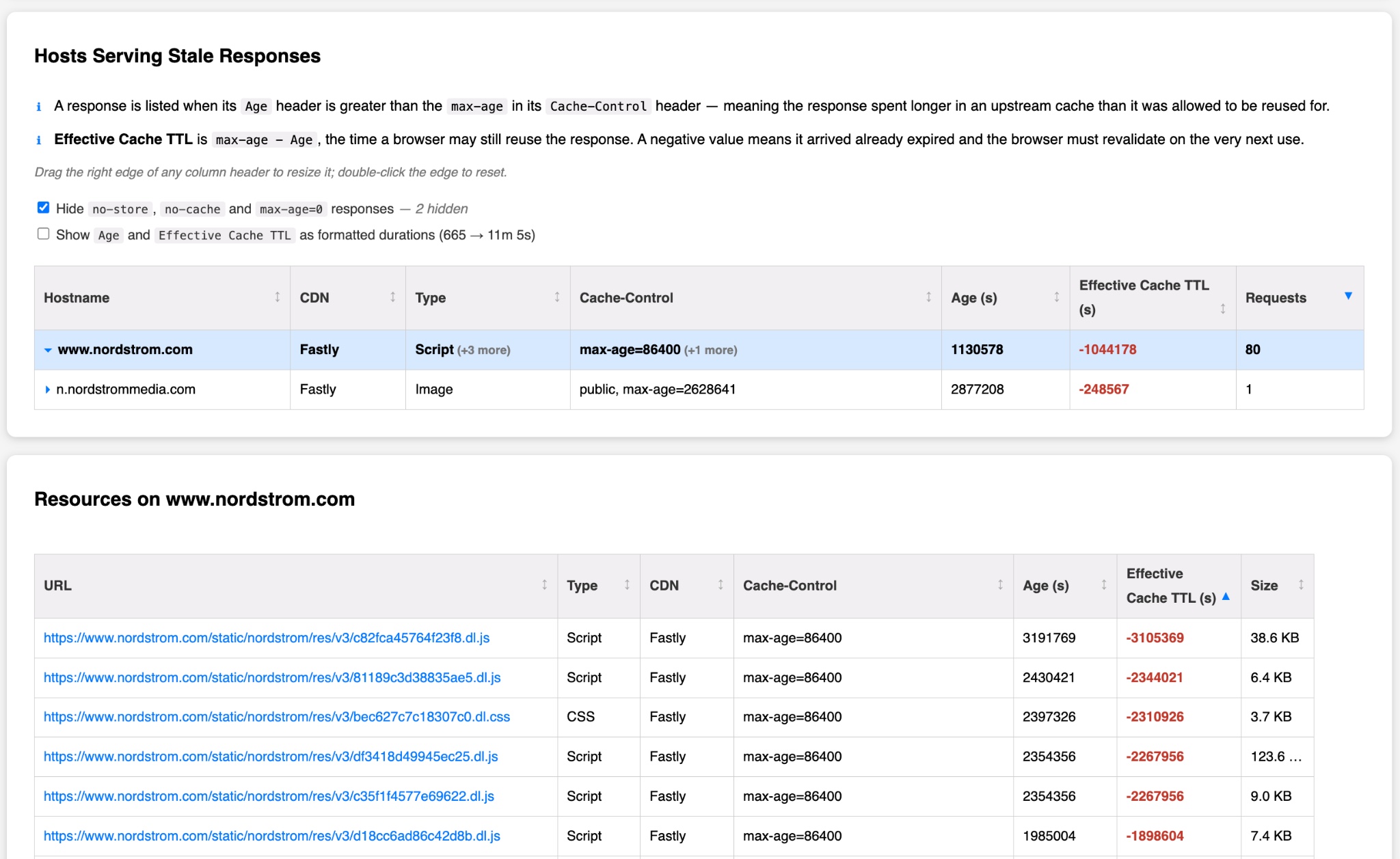
Nordstrom served a total of 80 scripts, fonts and stylesheets with a freshness lifetime of 1 day, but an Age header indicating they were many days old. Like the previous example, these URLs are versioned and could likely benefit from a longer TTL and stale-while-revalidate.
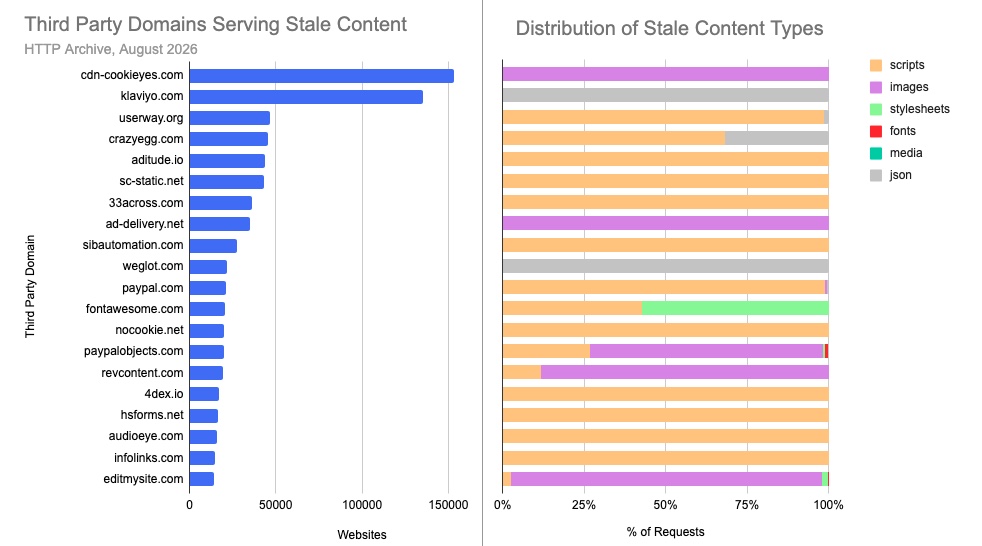
Third Party Content
The vast majority of content with a negative effective cache TTL appears to be the result of some popular third parties. The graph below shows a breakdown of the top 20 third parties serving stale content and the types of content served. Overall there were 17,297 third parties delivering a response with a max-age that was smaller than the Age of the resource. Another 4,932 third parties use stale-while-revalidate.
Cookieyes appears to be serving SVG images with a 10 hour max-age, while allowing the CDN to cache the response for 7 days:
max-age=36000, s-maxage=604800, proxy-revalidate
However their scripts and JSON responses are also cached on the CDN and delivered to the client with a max-age=0 as well as a must-revalidate which means that they will need to be revalidated every time they are requested.
Klaviyo sets a max-age value of either 5 or 10 seconds on requests such as https://static-forms.klaviyo.com/forms/api/v7/<customer-id>/full-forms.

Userway sets a max-age value for 1 hour on requests for https://cdn.userway.org/widget.js

CrazyEgg sets a max-age value of 5 minutes, while allowing their CDN to cache the response for 2 weeks

When looking at these third parties, they have an average cache time that varies between being stale for a few hours to many days! Additionally when looking at the minimum cache time for many of these third parties, we can see that some third parties are serving resources that have been stale for as long as 9 months!
| Third Party Domain | Pages | Average Cache Time | Minimum Cache Time |
|---|---|---|---|
| cdn-cookieyes.com | 153,335 | -386476 (~4d) | -568673 (~7d) |
| klaviyo.com | 135,472 | -649948 (~8d) | -5372699 (~2mo) |
| userway.org | 46,934 | -240696 (~3d) | -24275956 (~9mo) |
| crazyegg.com | 45,601 | -17593 (~5h) | -419010 (~5d) |
| aditude.io | 43,505 | -1756 (~29m) | -3539 (~59m) |
| sc-static.net | 43,238 | -43321 (~12h) | -85797 (~24h) |
| 33across.com | 36,152 | -158589 (~2d) | -558076 (~6d) |
| ad-delivery.net | 35,281 | -596657 (~7d) | -2504839 (~29d) |
| sibautomation.com | 27,693 | -3676 (~1h) | -43715 (~12h) |
| weglot.com | 21,720 | -924922 (~11d) | -1977318 (~23d) |
| paypal.com | 20,950 | -586366 (~7d) | -8516852 (~3mo) |
| fontawesome.com | 20,722 | -2779 (~46m) | -5399 (~1h) |
| nocookie.net | 19,867 | -5405 (~2h) | -10800 (~3h) |
| paypalobjects.com | 19,757 | -1220213 (~14d) | -23115364 (~9mo) |
| revcontent.com | 19,270 | -41597 (~12h) | -86339 (~24h) |
| 4dex.io | 17,020 | -188760 (~2d) | -176522 (~2d) |
| hsforms.net | 16,700 | -263 (~4m) | -3295 (~55m) |
| audioeye.com | 15,752 | -9540 (~3h) | -17999 (~5h) |
| infolinks.com | 14,574 | -5324 (~1h) | -10799 (~3h) |
| editmysite.com | 14,093 | -111717 (~1d) | -1208724 (~14d) |
Conclusion
HTTP Caching gets complicated when weighing freshness and revalidation requirements for content. When strategizing on a caching strategy, it’s important to consider how long you are willing to allow content to be served stale for and whether to serve that content stale at all. However in scenarios where multiple caches are in use, it’s important to ensure that a caching strategy on a CDN does not undermine the caching strategy on the client browser. In all of the cases above, a stale-while-revalidate directive would have proven useful. Also the gap between max-age and s-maxage should be evaluated based on the content sensitivity. If you are serving a versioned asset or something that is generally long lived like a font or image, then it’s often better to cache them longer.
If you’ve determined that there are some issues to address on your site based on this, you may want to evaluate whether your performance has improved after remediating them. Likely this would manifest within the long tail of performance - so I would look at the p95 or p99 of the First Contentful Paint (FCP) or Largest Contentful Paint (LCP) metrics. If you’ve made changes to first party caching rules, then it’s also worth monitoring your CDN usage, since eliminating redundant requests may also produce some cost savings.
HTTP Archive queries
This section provides some details on how this analysis was performed, including SQL queries. Please be warned that some of the SQL queries process a significant amount of bytes - which can be very expensive to run. Find Requests Served with a Negative Effective Cache Time
Warning: This SQL query processes approximately 6.3 TB of data. Running this query can be very costly. The results of this query have been saved in the table `httparchive.scratchspace.202608_negative_cache_time`.
WITH request_data AS (
  SELECT
    rank,
    page,
    url,
    type,
    JSON_VALUE(payload._cdn_provider) AS cdn,
    SAFE_CAST(JSON_VALUE(payload._cache_time) AS INT64) cache_time,
    (SELECT header.value FROM UNNEST(response_headers) AS header WHERE LOWER(header.name) = 'cache-control' LIMIT 1) AS cache_control,
    (SELECT SAFE_CAST(header.value AS INT64) FROM UNNEST(response_headers) AS header WHERE LOWER(header.name) = 'age' LIMIT 1) AS age,
  FROM
    `httparchive.crawl.requests`
  WHERE
    date = "2026-08-01"
    AND is_root_page = TRUE
    AND client = "mobile"
    AND SAFE_CAST(JSON_VALUE(payload._cache_time) AS INT64) IS NOT NULL
)

SELECT *
FROM request_data
WHERE
  cache_time < 0
  AND age > 0
  AND LOWER(cache_control) LIKE "%max-age%"
Summary of Sites Serving Stale Content
This uses the table created in the first query to avoid excessive query costs. It processes less than 1GB of data.
WITH neg_ttl_sites AS (

SELECT
  rank,
  "All" AS description,
  COUNT(DISTINCT page) AS sites,
FROM `httparchive.scratchspace.202608_negative_cache_time`
GROUP BY 1
UNION ALL

SELECT
  rank,
  "First Party" AS description,
  COUNT(DISTINCT page) AS sites,
FROM `httparchive.scratchspace.202608_negative_cache_time`
WHERE NET.REG_DOMAIN(page) = NET.REG_DOMAIN(url)
GROUP BY 1

UNION ALL

SELECT
  rank,
  "Third Party" AS description,
  COUNT(DISTINCT page) AS sites,
FROM `httparchive.scratchspace.202608_negative_cache_time`
WHERE NET.REG_DOMAIN(page) != NET.REG_DOMAIN(url)
GROUP BY 1
)

SELECT rank,
  SUM(IF(description = "All", sites, 0)) AS all_sites,
  SUM(IF(description = "First Party", sites, 0)) AS first_party,
  SUM(IF(description = "Third Party", sites, 0)) AS third_party,
FROM neg_ttl_sites
GROUP BY 1
ORDER BY 1 ASC
Avg and Min Negative Cache Time for Third Parties
This uses the table created in the first query to avoid excessive query costs. It processes less than 1GB of data.
SELECT
  NET.REG_DOMAIN(url) AS third_party,
  COUNT(DISTINCT page) AS pages,
  ROUND(AVG(cache_time)) AS avg_cache_time,
  MIN(cache_time) AS min_cache_time
FROM `httparchive.scratchspace.202608_negative_cache_time`
WHERE
  NET.HOST(page) != NET.HOST(url)
  AND cache_control NOT LIKE "%must-revalidate%"
  AND cache_control NOT LIKE "%stale-while-revalidate%"
GROUP BY 1
ORDER BY 2 DESC
LIMIT 20
Stale resource summary for specific third parties
This uses the table created in the first query to avoid excessive query costs. It processes less than 1GB of data.
Substitute {HOSTNAME} for the hostname you want to search for.
SELECT
  NET.HOST(url) as hostname,
  type,
  cache_control,
  COUNT(*) AS requests
FROM `httparchive.scratchspace.202608_negative_cache_time`
WHERE
  cache_control NOT LIKE "%must-revalidate%"
  AND cache_control NOT LIKE "%stale-while-revalidate%"
  AND NET.REG_DOMAIN(url) = "{HOSTNAME}"
GROUP BY 1,2,3
ORDER BY 4 DESC