Investigating a Curious Case of Font Format Fallbacks
Every month the NY WebPerf Meetup runs a session called Meet4Speed, where Sergey Chernyshev and I meet with members of the local developer community and talk about web performance. It’s an incredibly fun and interactive meetup. There is no presenter in this format. Instead we sit around a large conference room table, share a few pizzas (which also serves as an effective way to lure me into NYC), talk shop and learn from each other.
The websites we analyze are picked from attendees. So we never know what we’re going to optimize coming into these sessions. Sometimes attendees ask to analyze sites they work for or built and occasionally we’re analyzing sites that no-one has a connection to. We use publicly available tools like Chrome DevTools and WebPageTest. Hilariously a dance troupe once showed up because they thought “Web Performance” was a type of dance routine!
During last week’s session, we analyzed a popular eCommerce website. In a few short pizza consuming hours, we found:
- A third party performance feature loaded suboptimally and resulting in a single point of failure (SPOF)
- Fonts that were used to style a relatively tiny portion of the pages text.
- A font that was used for only 5 glyphs, and could be easily subsetted
- Preloaded scripts that were not being utilized at all
- A CDN image optimization silent failure that cached an unoptimized image
- Lazy Loaded images that… weren’t lazy loading.
But one issue we discovered surprised me: A font fallback to an alternative format due to font decoding failures. This is very uncommon, and unlikely to be an issue with your site. But I learned a lot while digging into it and figured I’d write this post to share what we learned!
FontAwesome x3
While analyzing a waterfall graph for this site’s homepage, we noticed that the popular FontAwesome font was loading 3 times. The graph belowis filtered to these 3 requests using Waterfall Tools, and you can see that one font loads after the other. First WOFF2, then WOFF, and finally TTF. The same behavior was observed on Chrome, Safari and Edge.
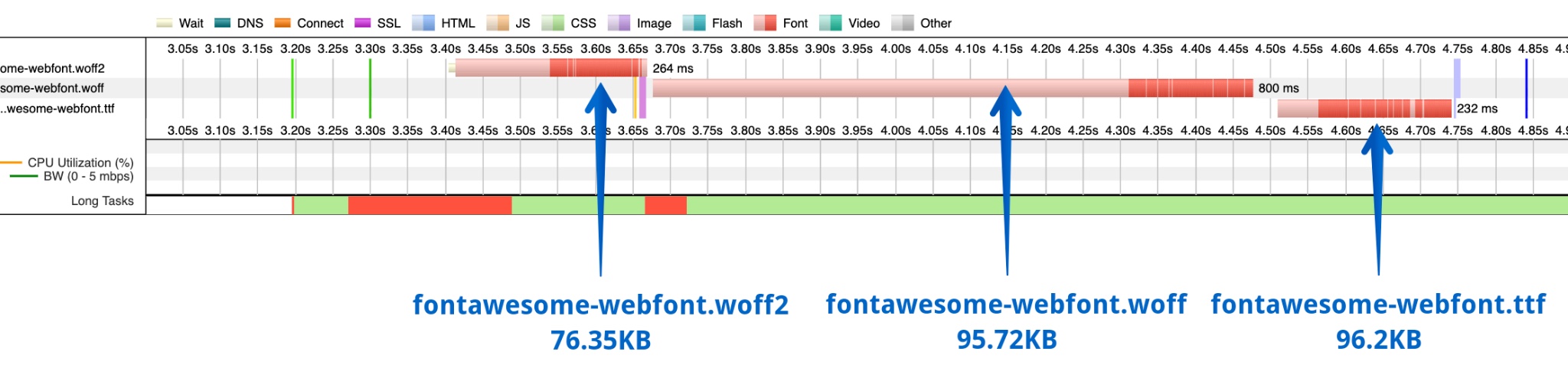
The usual cause for seeing multiple formats for the same font would be accidental preloading. However if that was happening then there wouldn’t be a sequential pattern of requests. We checked anyway, and there were no font preloads in their Early Hints, HTTP response headers or HTML response payload.
The only place the font was referenced was a single CSS file. There is nothing wrong with the syntax of this font-face directive. The browser should have selected the first supported font format in the list and requested that file. For pretty much all modern browsers this would be WOFF2.
@font-face {
font-family: 'FontAwesome';
src: url('../fonts/fontawesome-webfont.eot?v=4.7.0');
src: url('../fonts/fontawesome-webfont.eot?#iefix&v=4.7.0') format('embedded-opentype'),
url('../fonts/fontawesome-webfont.woff2?v=4.7.0') format('woff2'),
url('../fonts/fontawesome-webfont.woff?v=4.7.0') format('woff'),
url('../fonts/fontawesome-webfont.ttf?v=4.7.0') format('truetype'),
url('../fonts/fontawesome-webfont.svg?v=4.7.0#fontawesomeregular') format('svg');
font-weight: normal;
font-style: normal
}
Font Conversion Errors?
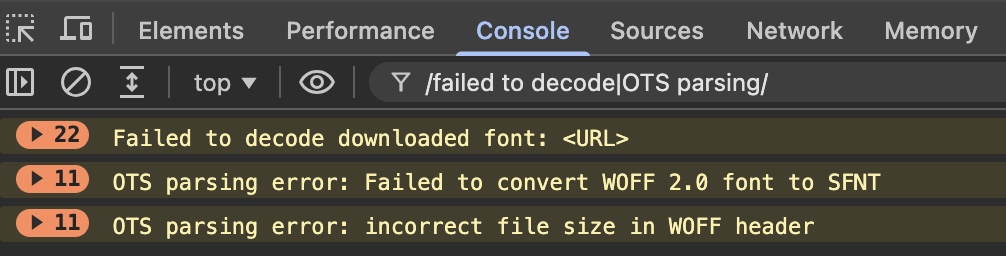
So what’s going on here? The Console in Chrome DevTools provided a clue: multiple error messages for the WOFF2 and WOFF fonts. There were 11 messages logged for each error, likely because each attempt to use the font resulted in an attempt to decode it. The errors observed were:
- First a
Failed to decode downloaded fonterror, which appeared for WOFF2 and WOFF fonts. - Next a
Failed to convert WOFF 2.0 font to SFNTerror on the WOFF2 font. - And finally
OTS parsing error: incorrect file size in WOFF headeron the WOFF font.
(I also checked Safari Web Inspector, but there were no errors logged to the console.)
SFNT is an acronym that I was unfamiliar with. It stands for “Spline Font” and it’s a container for TrueType font data. Apparently this format dates all the way back to Apple’s QuickDraw software, which started using the format in 1991!. There’s some more history here.
Digging Into Chromium Source
But what on earth is a web browser doing with SFNT? Well, examining the source code in Chrome we can see that the WOFF2 and WOFF font file formats are converted internally to TTF fonts using SFNT. So ultimately this container is what the browser is using to hold the font data after it’s decoded. Those error messages show up when the browser is unable to parse the font.
BTW - if the thought of digging into Chromium source code sounds somewhat terrifying, check out Eric Lawrence’s excellent blog post on demystifying browsers. It’s a few years old, but incredibly helpful and relevant if you want to dig deep into browser internals.
In Chromium, web_font_decoder.cc attempts to decode the WOFF2 file and throws the error we observed when it is unable to decode the font.

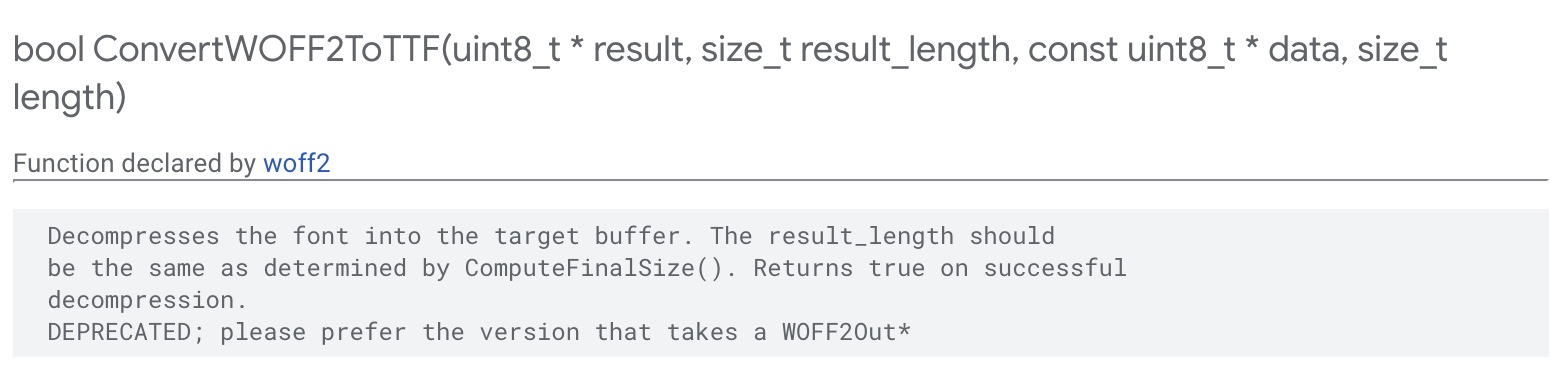
The ConvertWOFF2ToTTF function also provides some context. The result_length should be the same as determined by ComputeFinalSize(). So something seems to be wrong with the size of the font asset.
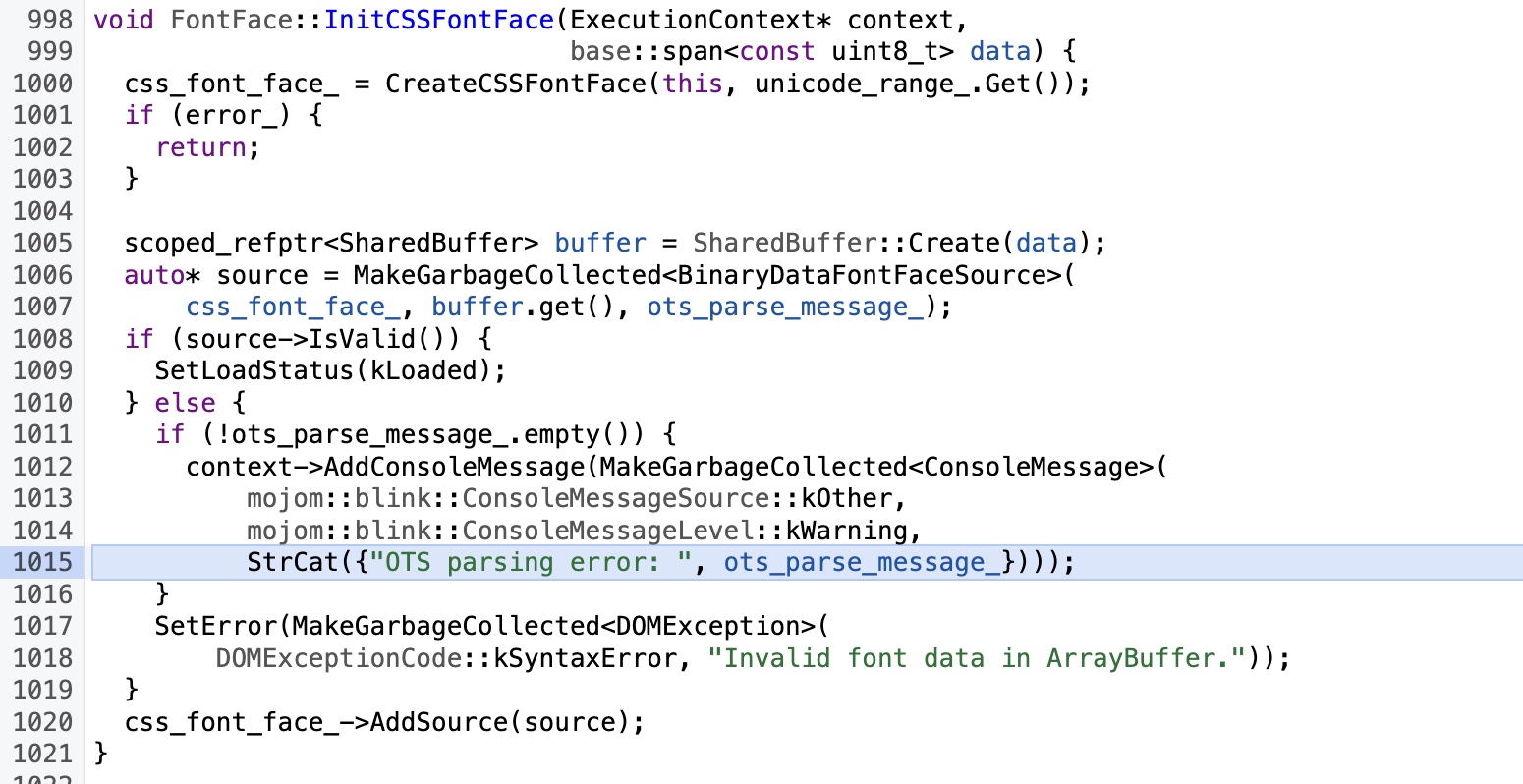
The other error appears in font-face.cc, which contains a function named InitCSSFontFace that attempts to convert the WOFF format to TTF. It throws the error we saw when it is unable to parse the font using OTS (which is a sanitizer for OpenType fonts, and another acronym I learned today!).
This font is how many bytes?
When looking at the response headers for the fonts, the Content-Length header tells the browser how many bytes are being delivered in the response payload.
- The WOFF2 file was
77,159bytes - The WOFF file was
98,019bytes
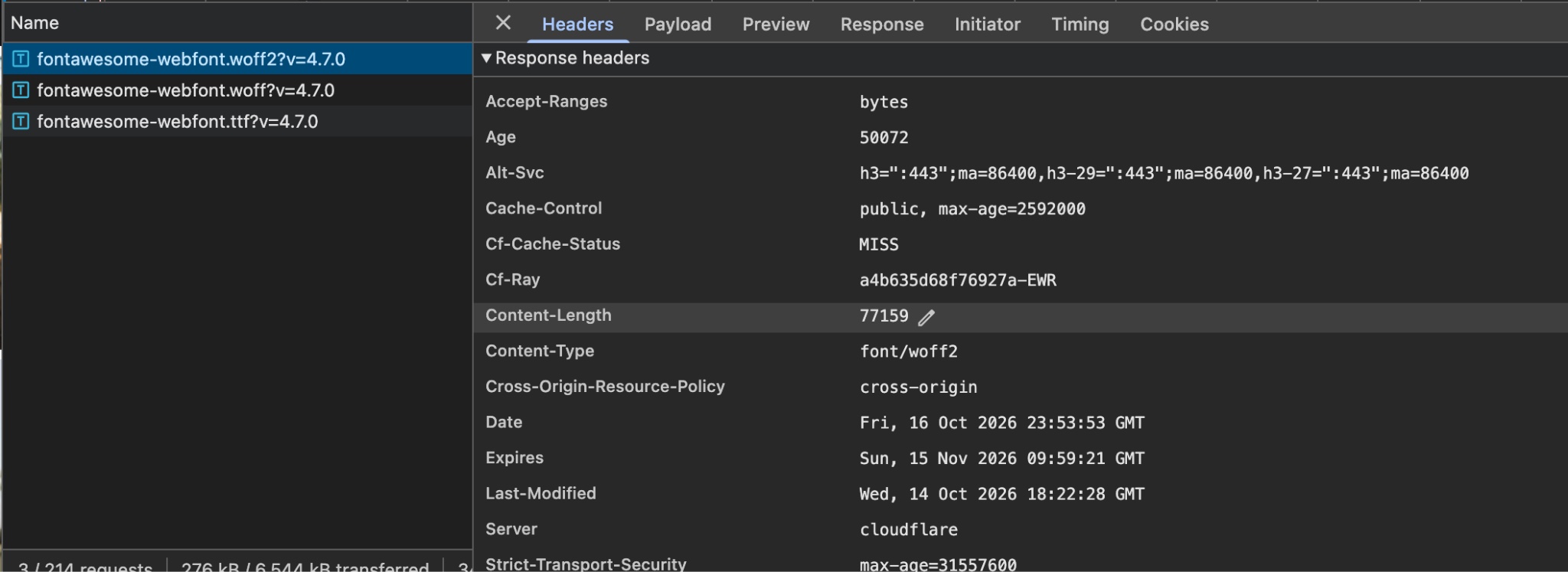
Since the error message we observed clued us into a size mismatch, I downloaded each font file and looked at the actual size of the font asset on disk. The WOFF2 file was exactly 77,159 bytes and the WOFF file was 98,019 bytes. So the HTTP response header matches the file size, the file was fully downloaded by the client, and the CDN server properly reported the content-length.
$ wget -O fontawesome-webfont.ttf "URL"
$ wget -O fontawesome-webfont.woff "URL"
$ wget -O fontawesome-webfont.woff2 "URL"

$ stat -f "%z %N" fontawesome-webfont.*
165548 fontawesome-webfont.ttf
98019 fontawesome-webfont.woff
77159 fontawesome-webfont.woff2
Interpreting the Font Header
Read that error in DevTools again: OTS parsing error: incorrect file size in WOFF header. In the earlier section I assumed this meant the HTTP response header, but this wasn’t about HTTP. This is about the file itself, which contains it’s own header!
Based on the WOFF2 specification, there is a header encoded in a WOFF2 file that contains a signature indicating the file format, the font type, the length and additional information. Each of these are UInt32 values, which equates to 4 bytes in the response payload for each value. A WOFF file contains the same header format.
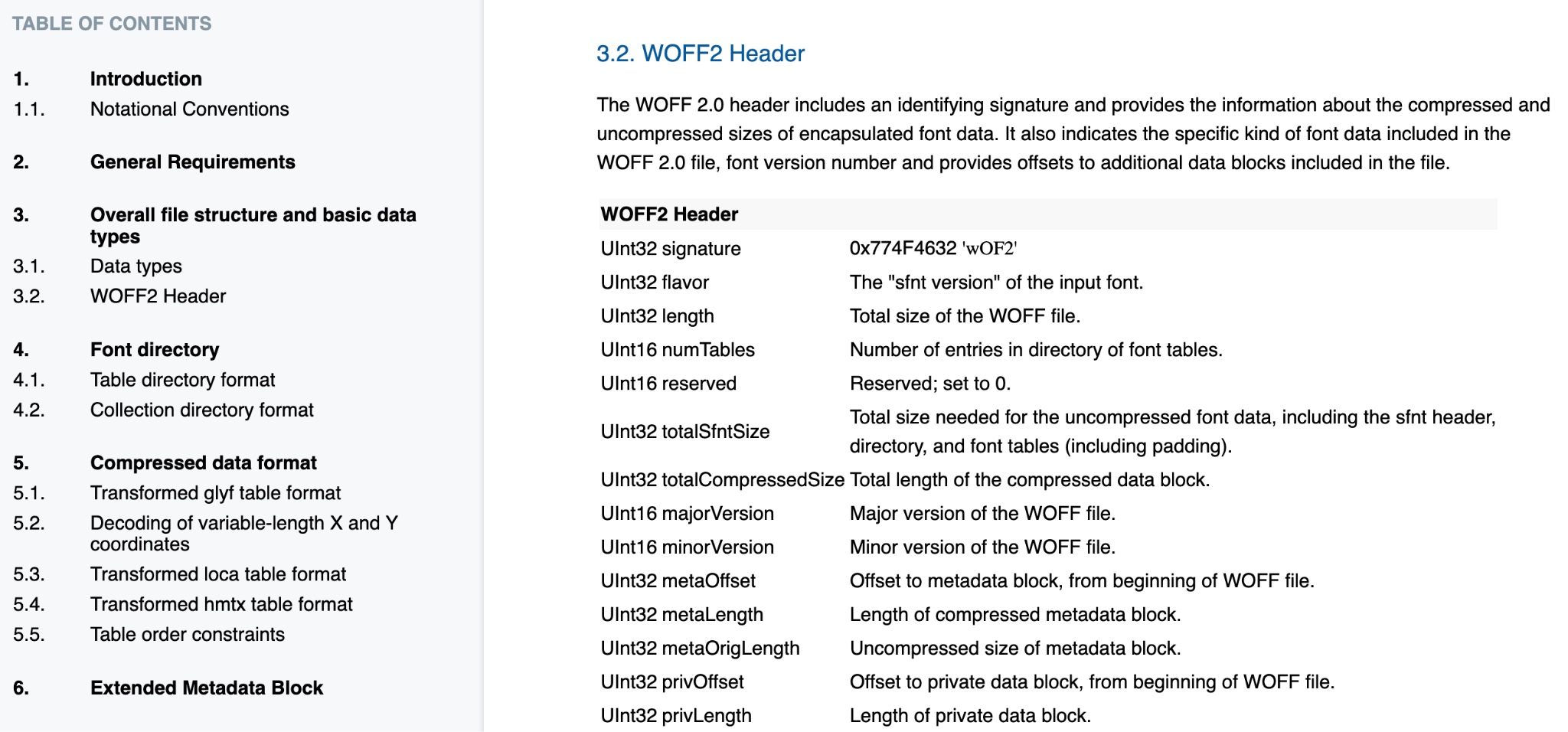
Extracting the first 12 bytes of that file, we get the following:
$ od -An -tx1 -N12 fontawesome-webfont.woff2
77  4f  46  32  00  01  00  00  00  01  2d  68

$ od -An -tx1 -N12 fontawesome-webfont.woff
77  4f  46  46  00  01  00  00  00  01  7e  e8
Grouped into 4 byte values, the WOFF2 header contained:
77 4f 46 32= “wOF2” (you can see some common file signatures here)00 01 00 00= True Type font00 01 2d 68= 0x12d68 =77,160bytes
And the WOFF file has the same header table format -
77 4f 46 46= “wOFF”00 01 00 00= True Type font00 01 7e e8=0x17ee8=98,024bytes
Putting this all together, here’s what we have:
| Format | Content-Length | Actual File Size | Font Header Size | Outcome |
|---|---|---|---|---|
| WOFF2 | 77,159 | 77,159 | 77,160 | Failed to convert WOFF 2.0 font to SFNT |
| WOFF | 98,019 | 98,019 | 97,024 | OTS parsing error: incorrect file size in WOFF header |
How the file got corrupted is uncertain. Perhaps there was a version of it encoded incorrectly somewhere. Perhaps there was corrupt download when it was first retrieved. However, this was a very old version, as it says on Font Awesome’s website - “Font Awesome 4 is so 2017”. The easy fix is to replace it with a new version of the file. While they are at it, they should consider subsetting the font so that it only loads the bytes needed.

Conclusion
These NY WebPerf Meetup Meet4Speed sessions are super fun, and it’s always interesting to see what rabbit holes they takes us down. Fixing this issue will likely have a measurable effect on FCP for this website. While it’s unlikely that this issue affects a large number of websites (I checked the HTTP Archive and it’s not common), I learned a lot from this investigation and I hope you found some of this insightful too. If you are in the NYC area and want to join us next time, please do!
We also host speaker sessions as well, the next of which is scheduled for this upcoming Thursday! If you live near or are planning to visit NYC and would like to give a talk on web performance, we’re always looking for speakers - so please reach out!